
Two real migrations established the approach: Dropbox to SharePoint and SYSPRO to Zoho. In both cases, Klara reduced repetitive consulting work while customer leaders retained approval of access, mappings, balances and go-live. The same delivery approach can be assessed for other connected business systems.
Combined result from the two real migrations: approximately 775 hours of consulting effort saved.
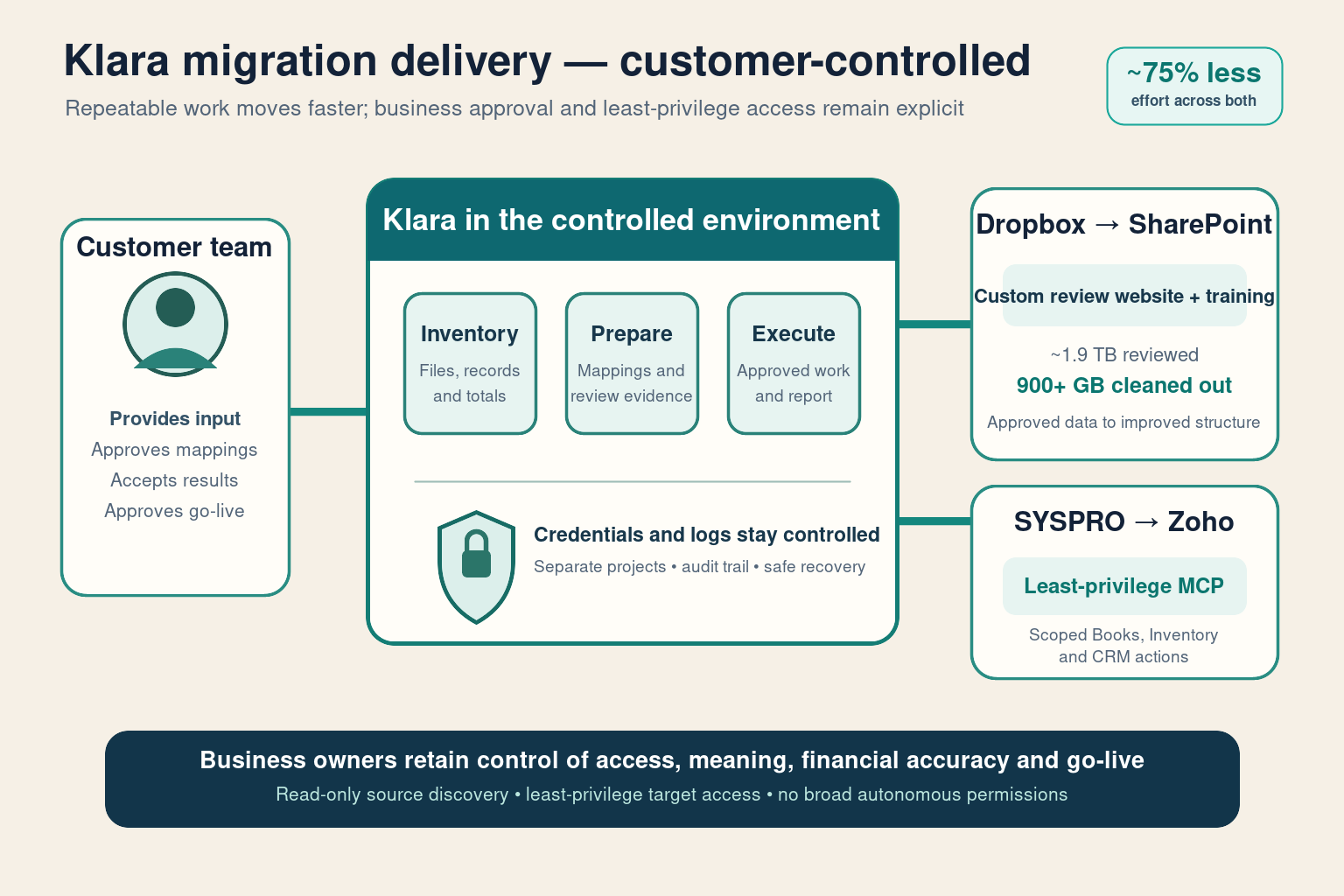
How a Klara migration works
Klara inventories the source, prepares mappings, runs repeatable migration batches, recovers failed work and reports progress. Business owners still approve record meaning, permissions, financial balances and the final go-live decision.
Business systems Barberry Labs can assess
A system is a strong candidate when Barberry Labs can securely read the required source data and write to the target through a supported interface. The first step is a practical interface and data review.
Files and documents
Dropbox, SharePoint, OneDrive, S3-compatible stores, SFTP and structured file exports.
ERP and finance
SYSPRO, Zoho Books, Sage, Xero and other platforms with supported APIs, exports or database access.
CRM and customer data
Zoho CRM, HubSpot, Salesforce and API-enabled customer or sales platforms.
Inventory and operations
Warehouse, stock, work-order, field-service and manufacturing systems with usable connectors.
Databases and warehouses
SQL Server, PostgreSQL, MySQL, controlled CSV pipelines and cloud data platforms.
Support, commerce and HR
Ticketing, e-commerce, payroll or HR systems where authorised interfaces expose the required records.
What your business needs before migration starts
| What is needed | Why it matters | How it can be provided |
|---|---|---|
| Safe access to the old system | Records must be reviewed without disrupting live operations | Approved read-only connection or controlled export |
| A supported way into the new system | Loads must be repeatable and controlled | Approved connector, import facility or system interface |
| Reliable record identifiers | Customers, accounts and transactions must match correctly | Agreed keys, mapping rules and duplicate handling |
| A safe place to test | Mappings and totals must be checked before go-live | Test environment or reversible pilot batch |
| Named business owners | AI cannot decide what financial or operational records mean | Finance, operations, security and system-owner approval |
Where your business saves time
| Klara handles | Business owners retain |
|---|---|
| Inventory records and files | Scope and legal authority |
| Prepare record mappings and supporting evidence | Meaning of records and business rules |
| Run repeatable loads and recover failed work | Security, permissions and production approval |
| Prepare totals, exceptions and progress summaries | Acceptance of results and go-live approval |
The point is not to remove the responsible people. It is to stop paying those people to wait for exports, count rows, chase files or watch progress bars.
See the real migration examples
- Dropbox to SharePoint: secure collection and staged file migration
- SYSPRO to Zoho: read-only discovery and least-privilege MCP
- Why Klara runs in the customer-controlled environment
Discuss your migration
Bring the system you are leaving, the system you are moving to and the business records that matter. Barberry Labs will assess the available connection options, expected effort saving and the approvals required for a controlled migration.