
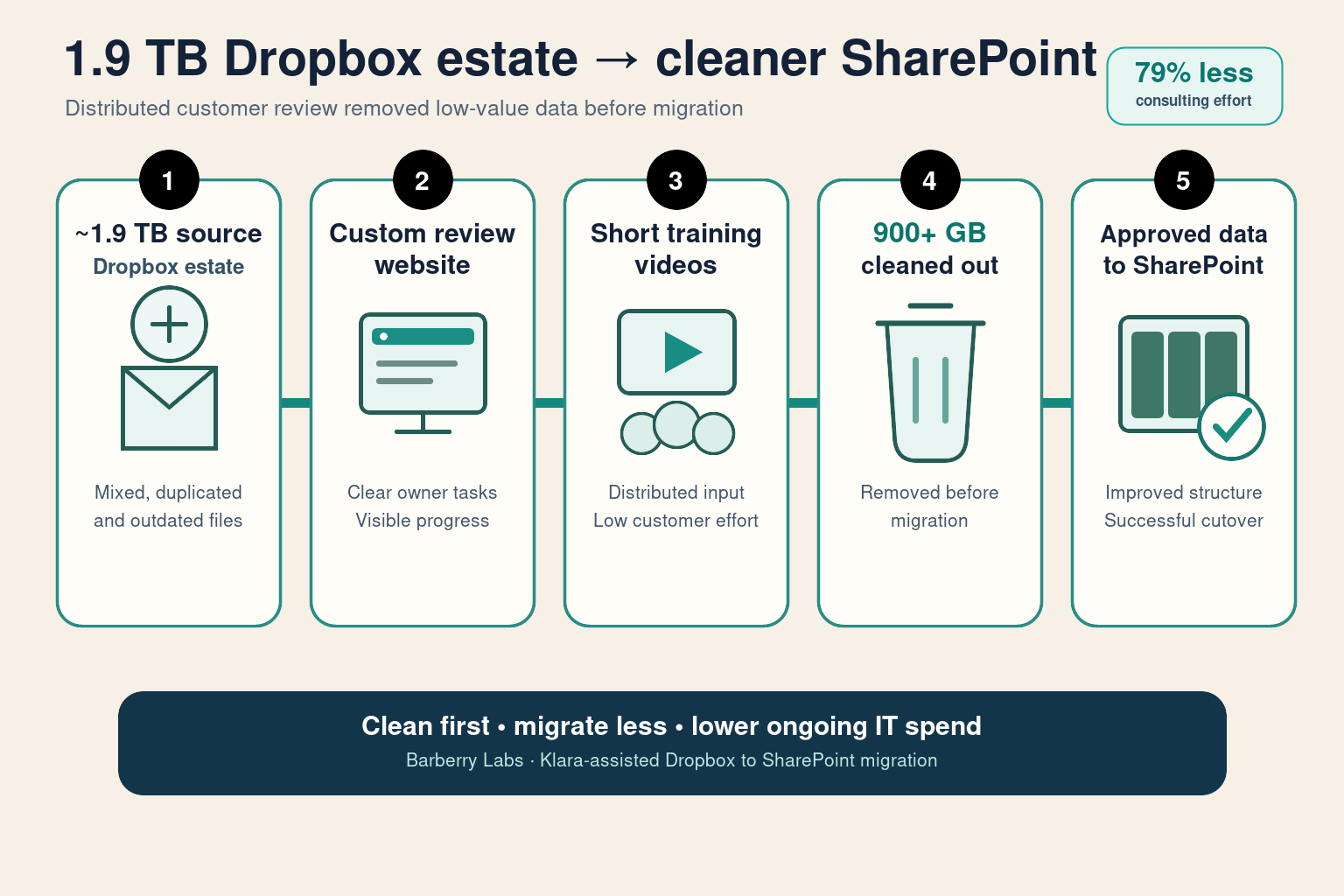
The result: The customer started with approximately 1.9 TB of Dropbox data. A purpose-built website, a better information structure and short training videos helped employees review their own content with minimal disruption. More than 900 GB of duplicated, outdated or unnecessary data was cleaned out before the approved business data was successfully migrated into SharePoint—reducing migration effort, storage overhead and ongoing IT spend.
Consulting effort saved: approximately 440 hours.
What changed for the business
The customer did not need a bulk copy of 1.9 TB of inherited Dropbox content. It needed a practical way for the people who understood the files to identify what mattered, remove what did not and place approved business records into a clearer SharePoint structure.
| Manual approach | Delivered approach |
|---|---|
| Move the full Dropbox estate, including duplicated and outdated content | Review first and clean out more than 900 GB before migration |
| Consultants repeatedly chase employees for decisions | A custom website gives each employee a clear, structured review path |
| Lengthy workshops explain the process to every participant | Short training videos let employees contribute when convenient |
| High customer effort and continued storage of low-value data | Distributed input, visible progress and lower migration and IT overhead |
Executive outcome: the customer turned a 1.9 TB cleanup into distributed, low-effort participation; removed more than 900 GB before cutover; improved the new information structure; and reduced both consulting effort and ongoing IT spend.
Effort comparison
The comparison below reflects the work completed for this Dropbox-to-SharePoint migration.
| Work | Manual approach | Klara-assisted delivery | Time saved |
|---|---|---|---|
| Collect and organise employee files | ~120–200 h | ~24–40 h (campaign + links + portal) | ~100–160 h |
| Run and recover the file transfer | ~160–320 h | ~24–48 h (orchestrator + replay) | ~140–270 h |
| Create the SharePoint structure and libraries | ~64–96 h | ~16–24 h (scripted provisioning) | ~50–70 h |
| Monitor progress and resolve exceptions | ~40–80 h | ~8–16 h (agent + logs) | ~30–65 h |
| Total | ~560 h (~70 days) | ~120 h (~15 days) | ~440 hours |
Approximately 440 hours of consulting effort were saved on this migration.
Executive outcome: senior people spent their time approving structure, permissions and completion—not watching files copy.
What the company needed to achieve
- Identify which content in the 1.9 TB Dropbox estate still had business value.
- Let employees and business owners make decisions without creating a full-time cleanup project.
- Agree a better SharePoint structure before carrying old problems into the new platform.
- Keep migration progress visible and recoverable without constant consultant oversight.
On this anonymised engagement, source content lived in Dropbox Business. The destination was Microsoft 365 SharePoint with real departmental libraries — Commercial, Marketing, Finance, HR, Warehouse, QMS, and more — plus dedicated migration staging.
How the migration was delivered
1. Agree the destination before moving data
Department libraries, ownership and permissions were agreed before the bulk move. Incoming files remained separate from approved company records until their owners accepted them.
2. Give each employee a clear collection path
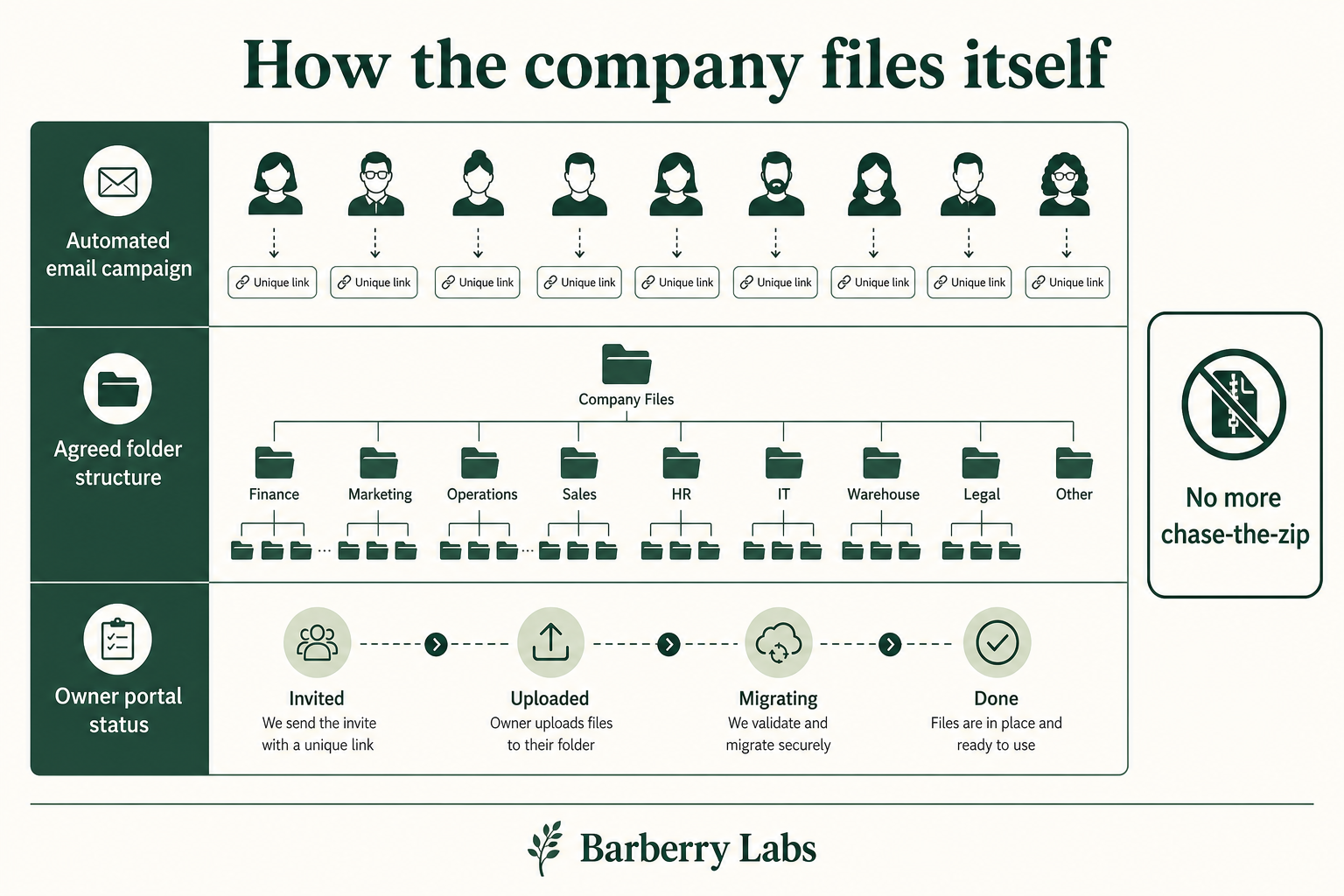
Barberry Labs built a purpose-specific website that gave each employee a clear review path into the agreed structure. Short training videos showed people what to keep, what to remove and where approved work belonged.
This distributed the cleanup to the people closest to the data, kept customer effort low and gave management a clear view of participation, progress and outstanding decisions.
3. Use a controlled staging environment
The migration ran in a dedicated, controlled environment. Credentials stayed within that environment, and management updates contained progress and exceptions rather than confidential file contents.
4. Keep the migration moving without constant oversight
- Each employee’s files moved as a separate, traceable job.
- Transfers continued without a consultant watching every step.
- Failed folders could be retried without restarting completed work.
- Progress and exceptions were summarised for management review.
Klara summarised progress, separated routine delays from genuine decisions and proposed the next safe action. Meetings were reserved for approvals and exceptions.
Controls retained throughout the migration
When copy and chase are automated, the quality conversation gets honest:
- Restricted access to only the systems and records required
- Staging before final publication in SharePoint
- Owner review for personal files, duplicates and outdated content
- Cleanup and retention rules after cutover
- A clear audit trail for every collection and transfer
Speed without that list is just risk with better marketing.
Why the delivery used less effort without losing control
Most Dropbox to SharePoint migration articles sell a tool. We sell an operating pattern:
- Klara operates in a controlled customer environment
- Repeatable automation performs the routine transfer work
- Business owners approve structure, permissions and completion
- Every migration step leaves an audit trail
Intelligence as an operator, not a place you dump confidential trees.
How employee files were collected and moved
What executives should take from this
- Do not pay to migrate data the business no longer needs.
- A simple custom experience can turn cleanup into distributed, low-effort participation.
- Short training videos reduce meetings and help people make consistent decisions.
- Agree the new structure before moving data into SharePoint.
- Less data, less consulting oversight and a cleaner destination can produce significant IT-spend savings.
Explore the migration series
- Real example: SYSPRO to Zoho migration
- How the secure Klara migration platform works
- Where the same approach can be used for other business systems
Talk to us
Planning a Dropbox to SharePoint Online or broader Microsoft 365 migration? Book an architecture session with Barberry Labs. We will assess what should be cleaned before migration, how to gather customer input with low effort, the expected IT-spend saving and the most practical route to completion.