
The result across two migrations: Dropbox-to-SharePoint and SYSPRO-to-Zoho required approximately 264 hours of Klara-assisted delivery, compared with about 1,040 hours for the same scope delivered manually. That saved approximately 775 hours of consulting effort without delegating business approval to AI.
Consulting effort saved: approximately 775 hours.
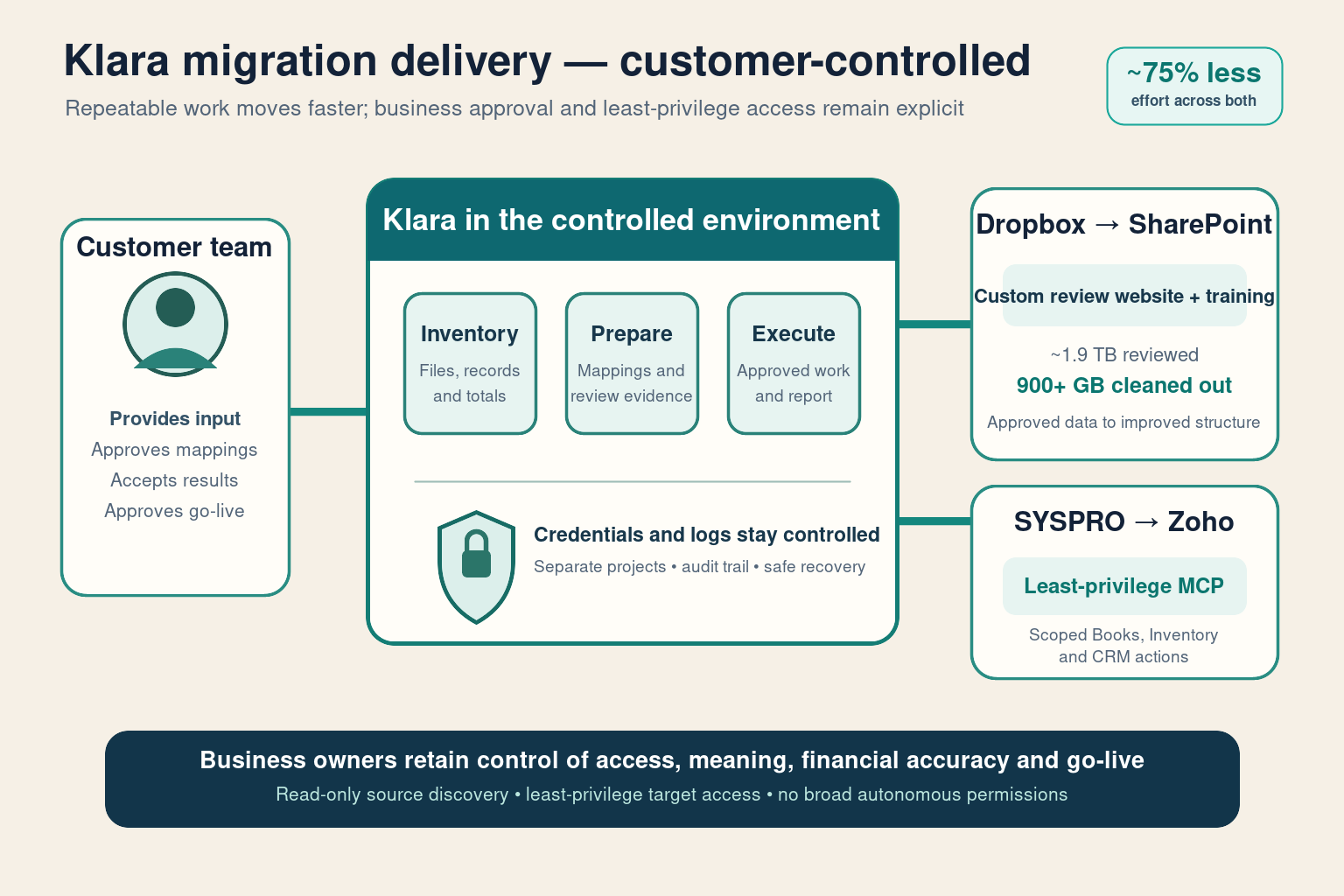
What changed for the customers
Klara handled repeatable discovery, collection, transfer, retries and progress reporting. Customer leaders and specialists remained responsible for the decisions that affected financial accuracy, access and go-live.
| Klara handled | Business owners approved |
|---|---|
| Source-record inventory and totals | Opening balance acceptance |
| Employee file collection and follow-up | “Is this junk or company IP?” |
| Overnight transfers and recovery | Final SharePoint library permissions |
| Management progress reports | Cutover “go / no-go” |
Executive outcome: routine migration work no longer consumed senior consulting time, while accountability remained with the people responsible for the business.
Effort comparison across both migrations
The comparison combines the two real customer examples in this series.
| Migration | Manual approach | Klara-assisted | Time saved |
|---|---|---|---|
| Dropbox → SharePoint Online | ~560 h | ~120 h | ~440 h |
| SYSPRO → Zoho Books / One | ~480 h | ~144 h | ~336 h |
| Combined | ~1,040 h | ~264 h | ~775 hours |
Approximately 775 hours of consulting effort were saved across the related migration work.
Executive outcome: roughly 100 consulting days moved from repetitive migration administration to customer priorities and decision-making.
The same Klara service across two real migrations
| Migration type | Source → Target | What Klara did |
|---|---|---|
| Files | Dropbox → SharePoint | Structured collection, staged transfer, recovery and progress reporting |
| ERP data | SYSPRO → Zoho One | Inventory records, prepare mappings and run approved actions through least-privilege MCP |
Each customer migration remains separated, with its own access controls and records. Shared rule: no customer-visible action without approval.
How customer control is protected
- Credentials stay inside the controlled environment rather than appearing in project chat.
- Access is restricted to the systems and records required for the migration.
- Zoho actions use least-privilege MCP permissions, not broad administrator access.
- Customer projects remain separated, including credentials and migration records.
- Management receives progress without exposed secrets.
- Failed work can resume safely without restarting completed migration stages.
This is how you automate migration without hourly consulting and without treating a public LLM as a dump zone for Dropbox trees or ledger extracts.
Controls that are never delegated to AI
- Pretend ERP cutover needs no finance sign-off.
- Move production data through untracked personal laptops “because the bot said so.”
- Sell “fully autonomous migration” as a substitute for correctness.
- Publish client secrets or unapproved customer names.
Explore the migration series
- Real example: Dropbox to SharePoint migration
- Real example: SYSPRO to Zoho migration
- Where the same approach can be used for other business systems
Talk to us
If you are planning a migration and want to reduce routine consulting effort without losing control, book a session with Barberry Labs. We will assess the systems, records, risk and approval path with you.